
Short answer: the Amazon Fire 7 Kids is the best Android tablet for most families starting out, and it suits children aged 3 to 7. It ships with a kid-proof case, a year of ad-free content and a two-year worry-free guarantee, so nothing else needs buying before a three-year-old can use it. Parents shopping for older children should read on, because screen size, storage and app access matter more once homework starts.
Every pick below is an Android tablet, not an iPad, and I have organised the whole roundup around the question parents actually ask: can I hand this to my child without standing over them? That means the control layer decides the winner far more often than the processor does. I compared eight tablets across parental control depth, case and warranty coverage, screen size, battery claims and app access, then sorted them by age band so you can jump straight to your child's bracket.
Four terms decide everything, and they are worth defining before the picks. Google Family Link is the free parent-supervision system on full Google Play Android tablets: you link your Google account to a child account, approve app installs remotely, cap daily screen time and filter content by age. Google Kids Space is a curated mode built on top of it, filled with teacher-approved apps and safe browsing that a child can leave without asking a parent for a password. Amazon Kids+ and the Amazon Parent Dashboard are the equivalents on Amazon Fire tablets. Fire OS is Amazon's own fork of Android, and the practical difference for parents is that it gives limited access to standard Google Play apps, so a Google Play tablet and a Fire tablet are not interchangeable purchases.
This guide was refreshed on 28 September 2026 and covers current-generation hardware only. Where a figure comes from the manufacturer rather than our own testing, I say so.
Our Top 3 Android Tablets for Kids Tested Against Everyday Family Use
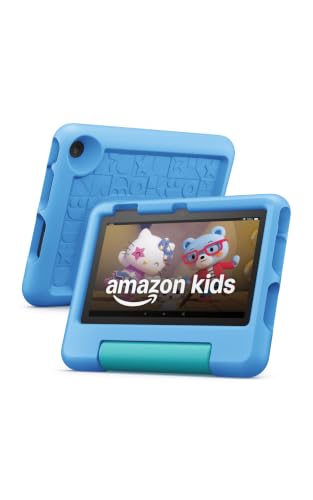
Amazon Fire 7 Kids
- Ages 3-7
- 7 inch screen
- Kid-proof case included
- Up to 10 hour battery
- 1 year Amazon Kids+ included
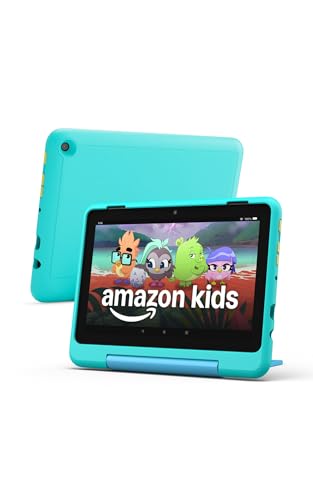
Fire HD 8 Kids Pro
- Ages 6-12
- 8 inch HD screen
- 13 hour battery
- 6 months Amazon Kids+ included
- Slim case
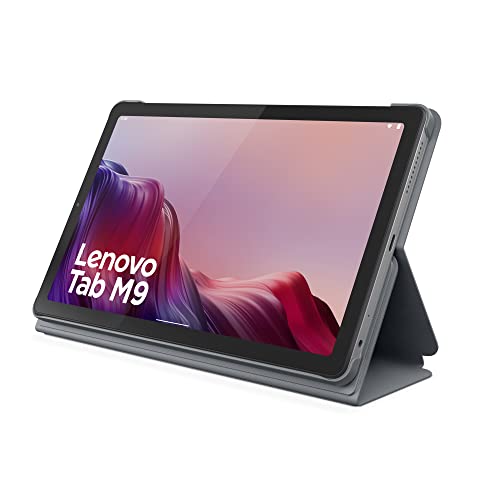
Lenovo Tab M9
- 9 inch 1340x800 LCD
- 13 hours video playback
- Folio case and screen protector
- Full Google Play
Comparing the Best Android Tablets for Kids Side by Side
All eight picks appear in the table below with the four details that decide the purchase: who the tablet is built for, how big the screen is, how long the manufacturer claims the battery lasts, and which parental control system does the enforcing of content. Every one of these tablets needs a protective case, so I have noted which ship with one in the box.
| Product | Highlights | Action |
|---|---|---|
| Amazon Fire 7 Kids |
|
Check Latest Price |
| Amazon Fire HD 8 Kids Pro |
|
Check Latest Price |
| Lenovo Tab M9 |
|
Check Latest Price |
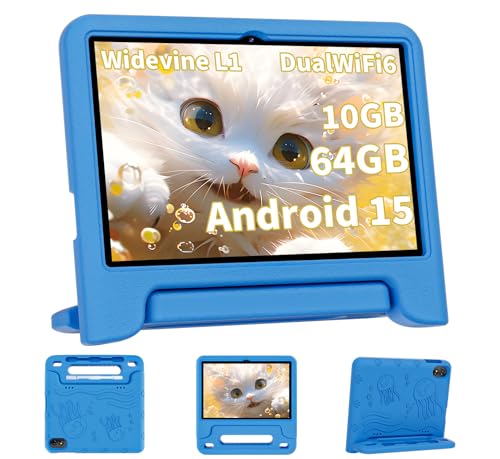 COLORROOM 10.1 Inch Android 15 COLORROOM 10.1 Inch Android 15 |
|
Check Latest Price |
 HOTTABLET 7 Inch Android 12 HOTTABLET 7 Inch Android 12 |
|
Check Latest Price |
 WXUNJA 10.1 Inch Android 15 WXUNJA 10.1 Inch Android 15 |
|
Check Latest Price |
 ATOZEE 10 Inch Android 15 ATOZEE 10 Inch Android 15 |
|
Check Latest Price |
 Plimpton 10.1 Inch Android 15 Plimpton 10.1 Inch Android 15 |
|
Check Latest Price |
1. Amazon Fire 7 Kids - The First Tablet for Ages 3 to 7
Amazon Fire 7 Kids tablet, ages 3-7. Top-selling...
Ages 3-7
7 inch screen
16 or 32 GB
microSD to 1TB
Up to 10 hours
Kid-proof case
What we like
- Kid-proof case in the box so no extra spend
- One full year of ad-free Amazon Kids+ content
- Parent Dashboard handles age filtering and time limits simply
- Two-year worry-free guarantee with free replacement
- Huge pool of over 20k parent reviews to learn from
What could be better
- 7 inch screen is small for streaming and schoolwork
- Limited access to standard Google Play apps on Fire OS
- 16 GB base storage fills quickly with downloads
This is the tablet most first-time parents end up with, and for children aged 3 to 7 it is the right default. The box already contains the case, so the one accessory you cannot skip is handled before the child opens it. That single decision removes the most common early mistake, which is a bare tablet surviving three weeks and then being banned.
The controls are deliberately blunt. Through the Parent Dashboard you set age filters, declare educational goals and cap daily time without hunting through settings menus, which matters when you are configuring it at bedtime. Amazon Kids+ is included for a year, and the content behind it is ad-free, which removes the most tedious part of handing a small child a screen.
What the age label is honest about is the size. A 7-inch panel is right for a four-year-old on the sofa and wrong for a seven-year-old with a school reading app open. Storage is the other limit: 16 GB fills with downloaded shows quickly, though a 32 GB version exists and microSD expansion goes up to 1TB.
Battery, Storage and What Happens After the First Year
Amazon claims up to 10 hours of use, which is a manufacturer figure rather than a tested one, and it is enough for a long car journey or a full film. The two-year worry-free guarantee is the real standout here, because it replaces a damaged unit rather than sending you into a repair queue.
After the included year, Amazon Kids+ renews at a monthly charge unless you cancel. If your child only uses a handful of free apps, cancel it and nothing important disappears, but the content library does shrink, so factor the renewal into your decision if you plan to rely on it.
Who It Suits and Who Should Skip It
Buy this for a preschooler or a first-grader, or as a second device so two siblings are not fighting over one screen. The weight and size are genuinely portable, which is why it works so well in the car and on a flight.
Skip it if your child is heading into schoolwork, needs Google Classroom, or wants the full Google Play catalogue. Fire OS gives limited access to standard Google Play apps, and that is a wall you cannot configure your way around. For those households, pick four or eight instead.
2. Amazon Fire HD 8 Kids Pro - The All-Rounder for Ages 6 to 12
Amazon Fire HD 8 Kids Pro tablet, ages...
Ages 6-12
8 inch HD screen
64 GB
microSD to 1TB
Up to 13 hours
Slim case
What we like
- Highest rated pick here at 4.6 stars
- 13 hour battery holds up under daily heavy use
- 64 GB storage avoids constant clean-up
- Slim case survives repeated drops and throws
- Remote approval of purchase and download requests
What could be better
- Fire OS still limits standard Google Play apps
- YouTube Kids cannot be downloaded through the Kids+ interface
- Kids+ auto-renews after the included 6 months
This is the model we recommend most often, because the gap between it and the 7-inch Fire 7 is exactly the gap that matters once a child turns six. The screen is bigger, the storage is 64 GB rather than 16 GB, the battery claim jumps from 10 to 13 hours, and the case is slimmer so an older child does not feel babyish carrying it.
It is also the best rated tablet in this roundup by a clear margin, sitting at 4.6 stars from more than 5,700 reviews. The 2024 hardware revision moved to a hexa-core processor with up to 4 GB of RAM, which is the kind of headroom that keeps a tablet usable for years rather than months.
Parental Controls That Work Remotely
You can review your child's activity, then approve or deny purchase and download requests from your own phone rather than walking over to the tablet. Safe browsing comes with built-in content filtering and site blocking, so the filtering does not depend on the child cooperating with an app-level setting.
Voice and video calls over Wi-Fi are restricted to contacts you approve, which turns the tablet into a permitted video-calling device rather than an open line. For a child walking home alone or wanting to see a grandparent, that approval list is the safety feature that matters.
Where the Software Annoyances Sit
Two gripes come up repeatedly in the reviews. Fire OS still limits access to standard Google Play apps, and YouTube Kids cannot be downloaded through the Kids+ interface, so parents who want strict YouTube management have to work around the app store rather than install and restrict.
The 6-month Amazon Kids+ period is shorter than the year on the 7-inch model, and it auto-renews after that. Six months is enough to see whether your child uses the library enough to justify it.
Who It Suits and Who Should Skip It
This is the right choice for a primary school child who reads, watches and video-calls, and for sibling households that need separate devices. The 8-inch HD panel is the sweet spot in this roundup for portability versus usable text size.
Skip it if the household relies on Google Play apps for school. The Fire range pairs tight content curation with a two-year worry-free guarantee and free replacement, so on breakage this is the safer of the two Fire picks.
3. Lenovo Tab M9 - The Big-Screen Pick for Older Kids and Homework
Lenovo Tab M9-2023 - Tablet - Long Battery Life...
9 inch 1340 x 800 LCD
3 GB RAM
32 GB
microSD expansion
13 hours video
Folio case
What we like
- 13 hours of claimed video playback in a thin body
- Folio case and screen protector plus full charger in the box
- Full Google Play with Google Lens for homework help
- Light 13.44 ounce metal and glass build
- Handles streaming and light productivity smoothly
What could be better
- 3 GB RAM struggles with modern apps under load
- 32 GB storage is tight once system apps are counted
- Software updates can noticeably slow performance
The Tab M9 is the first pick on this list that is not sold as a children's tablet, and that is precisely why it suits a nine-year-old. A 9-inch 1340 x 800 LCD panel is large enough for a document and a textbook side by side, and the metal and glass body does not look like toy plastic in a school bag.
The box is unusually generous for this price band: a folio case, a screen protector and a full charger all ship together, so a household that was already planning to buy a case does not have to. Battery life is the quiet headline, with a 5100 mAh cell rated at up to 13 hours of video playback and owners reporting days between charges on light use.
Full Google Play and Google Lens for Schoolwork
Because this runs Android 12 or later with the Google Play Store intact, your child can install whatever the school actually assigns. Google Lens handles translation, homework help and object identification through the cameras, and the 8 MP rear camera makes scanning a worksheet practical rather than a novelty.
Facial recognition is built in, which gives a full Google Play tablet a front-facing lock screen without hunting for a third-party app. Dual speakers, a 3.5 mm audio jack and USB Type-C cover the ordinary needs, and the tablet is unlocked for all carriers if you ever add mobile data.
The 3 GB RAM Ceiling You Should Know About
Three gigabytes of RAM is the weak point, and reviewers are blunt about it. Modern apps plus a video call can push the tablet into slowdowns and crashes, and software updates on this hardware can make performance feel worse over time than the day you unboxed it.
Storage is 32 GB, expandable via microSD, and roughly half is consumed by system apps out of the box. Some buyers also report an unresponsive or misaligned on-screen keyboard and mediocre camera quality by current standards, so treat this as a reading and streaming tablet with light productivity rather than a full laptop replacement.
Who It Suits and Who Should Skip It
Choose it for a child aged 9 and up who needs Google Play for school, who reads a lot, and whose household will treat the tablet gently enough to keep 3 GB of RAM comfortable. The included folio case means the first drop is usually survived.
Skip it for a younger, drop-prone child, and skip it if you expect heavy multitasking or a long lifespan under load. The warranty is a one-year mail-in cover with one-year battery coverage, which is thinner protection than the two-year guarantees on the Fire models and the 5-year warranty on pick six.
4. COLORROOM 10.1-Inch Android 15 - Full Google Play on a Smaller Budget
COLORROOM 2026 Upgraded Android 15 Tablet, 10inch...
10.1 inch 1280x800 IPS
10 GB RAM
64 GB
6000 mAh
8-12 hours
EVA case
What we like
- Full Android 15 with the Google Play Store
- Google Kids Space with educator-endorsed apps
- 10.1 inch anti-blue-light display with auto brightness
- Case has a handle small children can carry
- Four colour options including Pink and Purple
What could be better
- Battery durability is the most common complaint
- Can get laggy under heavier or longer use
- No dedicated blue-light or night-brightness presets
This is the pick for a parent who wants the Fire 7 simplicity on a 10.1-inch screen, with the full Google Play Store underneath. It runs Android 15 on an octa-core Unisoc T606 chip with 10 GB of RAM and 64 GB of storage, expandable to 1TB via microSD, and it ships with an EVA case that has a handle on it.
Google Kids Space is pre-installed with educator-endorsed apps and parental controls aimed at ages 3 and above, so the same tablet can stay useful from preschool through primary school. The included case with a handle is a small detail that matters a great deal when the person carrying the tablet is four.
Screen, Audio and the Eye Comfort Features
The 10.1-inch IPS panel runs at 1280 x 800 with an anti-blue-light design and automatic brightness adjustment, which is a sensible default for long sessions. Dual stereo speakers at 1W per channel are adequate for a bedroom and a car, not for filling a room.
Connectivity is better than the price band suggests: Wi-Fi 6 on both 2.4 GHz and 5 GHz, Bluetooth, GPS and a 3.5 mm headphone jack, so a child can take it anywhere a school laptop goes. Cameras are a 2 MP front and 8 MP rear with 4K UHD video capture, which is enough for video calls and scanning worksheets.
Warranty Length Is the Selling Point, Battery Life Is the Complaint
The 180-day money-back period and 5-year warranty are unusually long for a tablet at this level, and there is a single report of a false low-battery error that prevented the tablet from powering on at all. That is a single account, but it is exactly the failure mode that matters when the device is your child's only entertainment on a long trip.
The recurring negative is battery durability. Owners report the 6000 mAh cell declining after a couple of months of use, and the claimed 8 to 12 hours of reading and video should be read as a new-device figure rather than a year-two figure. A minority also report the tablet getting laggy with heavier use after some time.
Who It Suits and Who Should Skip It
Pick it if your child needs Google Play apps and a large screen but the household does not want to spend flagship money, and if you value a 5-year warranty on a device a child will use hard.
Skip it if the tablet has to survive several years of heavy use without slowing down, and skip it if your child needs real multitasking. The heavier you load a Unisoc T606, the more the lag complaints apply, so keep expectations modest.
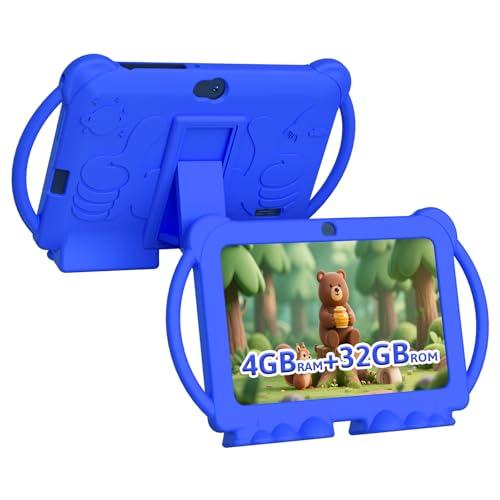
5. HOTTABLET 7-Inch - The Basic Starter Tablet With Full Google Play
HOTTABLET Kids Tablet 7 inch Android, 4GB RAM 32GB...
7 inch 1024x600 IPS
4 GB RAM
32 GB
3000 mAh
8 hours mixed
Case and stand
What we like
- Lowest outlay in the roundup with a case still included
- Google GMS certified with full Play Store access
- Kids mode allows custom child profiles with time limits
- Silicone case doubles as a stand for hands-free watching
- Widevine L1 support enables HD Netflix streaming
What could be better
- 1024 x 600 resolution on a 7 inch screen is the softest here
- 3000 mAh is the smallest battery capacity in the set
- Kids mode ships with a default password of 0000
This is the entry point: a 7-inch Android 12 tablet with Google Play access, a bundled silicone case that doubles as a stand, and a kids mode that lets you create customisable child profiles. For a first tablet for a three or four-year-old, the outlay is the smallest in this roundup and the setup is under five minutes.
It is the only pick at this level that is both GMS certified and equipped for HD streaming, so Netflix and other protected services work through Widevine L1 rather than dropping to a low-quality feed. An iWawa app comes preloaded with creative, brain-training and children TV content, which gives you something to hand over on day one.
Kids Mode, Profiles and the Password You Must Change
The kids mode supports customisable child profiles with screen-time limits, so two siblings can share one tablet with separate rules. This is the cheapest route to the per-child profile setup that most families only get on pricier devices.
One thing to do immediately: the default kids mode password is 0000. Change it before you hand the tablet over, because a four-year-old who has watched you tap four zeroes once will do it again. The eye protection mode and 300 nit maximum brightness also cap how bright the screen can go, which is reasonable for a young child in a dim room.
What the Modest Hardware Means in Practice
A 4-core Q8 processor at 1.8 GHz with 4 GB of RAM that is partly virtual, plus 32 GB of ROM, is entry-level hardware and reviewers treat it that way. It is a fine first tablet for video calls, drawing apps and a small set of educational downloads; it is not a device for a child running a dozen apps at once.
Some pre-installed apps and games cannot be removed, and the 3000 mAh battery gives about 8 hours of mixed use, the shortest runtime here. The 1-year warranty is the thinnest coverage among the picks that ship with a case.
Who It Suits and Who Should Skip It
Buy it for a toddler's first tablet, for a shared tablet in a bedroom, or as a backup that lives in the car. Because the case doubles as a stand, it works well for a long car journey where hands need to stay free.
Skip it if the screen needs to survive reading and schoolwork, because 1024 x 600 on a 7-inch panel is the lowest resolution here. Skip it if the household needs Google Classroom or a wide app catalogue beyond the basics.
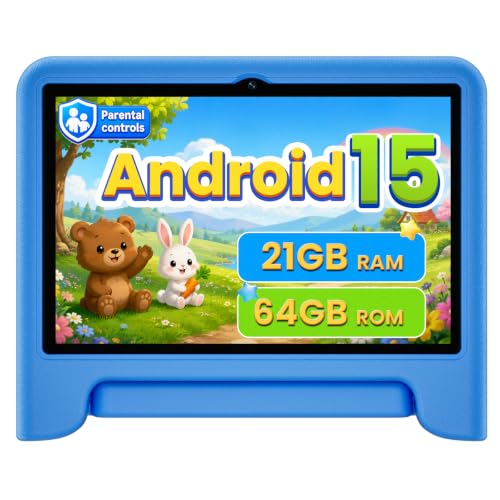
6. WXUNJA 10.1-Inch Android 15 - Big Screen With a Five-Year Warranty
Android 15 Kids Tablet 10.1 Inch, Octa-Core...
10.1 inch 1280x800 IPS
3 GB + 18 GB virtual
64 GB
6000 mAh
6 hours video
Case with stand
What we like
- 5 year warranty is the longest coverage in this roundup
- Google Kids Space pre-installed with app approval controls
- Silicone case with adjustable kickstand for hands-free viewing
- 18W PD fast charging
- Full Google Play access
What could be better
- Some units reported failing to power on or losing the parental PIN
- One report of an internal screen crack from a low carpet drop
- Only 6 hours of claimed video playback on 6000 mAh
This tablet exists to solve a specific problem: a large screen, a full app store, and a warranty long enough that a broken device is not a crisis. It runs Android 15 on the same octa-core Unisoc T606 platform as pick four, with 3 GB of physical RAM plus 18 GB of virtual RAM, 64 GB of storage and microSD expansion to 1TB.
The bundled silicone case has an adjustable kickstand, and that is why this is the car-ride pick. A 10.1-inch screen propped up at a stable angle in the back seat survives a two-hour journey far better than one handed over for the whole trip.
Controls, Split Screen and Everyday Connectivity
Google Kids Space is pre-installed and supports profile creation, with parental controls that require app approval rather than merely hiding an icon. The 10.1-inch 1280 x 800 IPS touchscreen adds eye-comfort blue-light reduction, dual-band WiFi, Bluetooth, GPS, wireless screen casting and split screen, so a parent can cast a lesson onto a larger display when needed.
There is face recognition for unlocking, and 18W PD fast charging means a top-up between school runs is more realistic than on a 5,000 mAh budget tablet. The stated runtime of up to 6 hours of video playback is the shortest claim among the large-screen picks, which is a trade for the larger cell and faster charging.
Hardware Failures Reported After Setup
The reviews are positive about setup and customer service, with several parents highlighting replacement of damaged units without hassle. Against that, a number of units failed to power on or lost the parental PIN shortly after setup, and there is one report of an internal screen breaking from a low fall onto carpet despite the case and screen protector.
Screen time and content filtering need a short learning curve on first setup, and a stylus was expected by some buyers but is not included. Treat the 5-year warranty as the reason to buy this over a cheaper 10-inch tablet, not the internals.
Who It Suits and Who Should Skip It
Choose it for a family that wants a big screen with Google Play, a case with a stand, and long warranty cover, or for a car journey tablet. It suits ages 3 and up because of the Kids Space profile system.
Skip it if your child needs more than 3 GB of real RAM, since the virtual allocation does not substitute for physical memory under load, and skip it if you would rather not troubleshoot screen time settings from scratch.
7. ATOZEE 10-Inch - The Toddler Pick With a Built-In Kickstand
Kids Tablet 10 Inch Android Tablet for Kids Comes...
10.1 inch 1280x800 LED
8 GB RAM
32 GB
6000 mAh
8 hours
Shock case
What we like
- Shock-resistant case with a stable kickstand for hands-free watching
- iWawa preloaded with Montessori lessons and multilingual content
- Parental control mode with hand-picked content and time limits
- 10 inch display in a 16 ounce body
- 7 inch and 10 inch sizes across six colours
What could be better
- Performance is noticeably slow and laggy at times
- Some units failed to power on shortly after delivery
- 1 year warranty is shorter than most rivals here
The ATOZEE is built around one idea: a tablet small enough for a toddler to carry and stable enough to set down. The shock-resistant case has an integrated kickstand and precise port cut-outs, and at 16 ounces with a 10-inch display it stays lighter than it looks.
It runs Android 15 with 8 GB of RAM, made up of 3 GB physical plus 5 GB extended, and 32 GB of storage expandable to 1TB via microSD. The parental control mode lets you hand-pick content, set screen time limits and keep browsing safe, and iWawa ships preloaded with Montessori lessons, mini-games and children's TV in multiple languages including Spanish.
Preloaded Content Saves Setup Time
Having Montessori-style lessons and a kids TV app already on the device matters most for a two or three-year-old, because there is something safe to hand over before you have approved a single app. The multilingual content is useful for bilingual households.
Wi-Fi 6 support, Bluetooth and a 3.5 mm headphone jack round out the basics, and the 2 MP front camera is fine for video calls and online classes. A 6000 mAh battery gives about 8 hours of average use, which is adequate for a full day of intermittent watching.
Where the Speed and Reliability Fall Short
Owners generally find the tablet durable, easy to set up and good value, but complaints centre on general slowness. A laggy tablet is especially frustrating for a young child, who taps more repeatedly than an adult, and a slow response reads to them as a broken app rather than a slow device.
Some tablets failed to power on shortly after delivery, and one reviewer reported an unresponsive power button. The 1-year warranty is the shortest among the picks that include a case, which matters more on a device most likely to be dropped.
Who It Suits and Who Should Skip It
Buy it for a toddler or preschooler who watches hands-free while you cook, travel or do homework nearby, and pick the 7 inch version if the child is small enough that a 10-inch panel is too much to handle.
Skip it if your child needs smooth performance for anything beyond watching and simple games, and skip it if a one-year warranty is not enough reassurance for the drop risk.
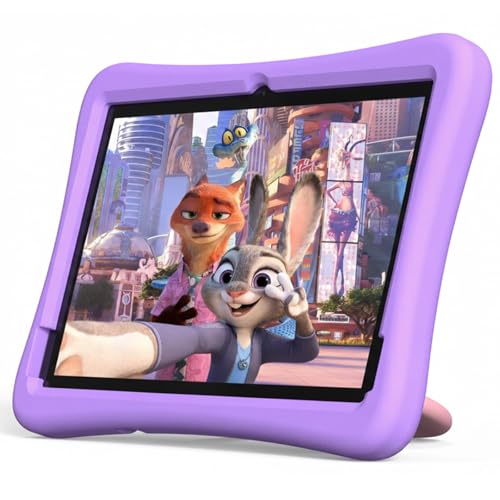
8. Plimpton 10.1-Inch - The Homework Pick With AI Help Built In
plimpton Kids Tablet 10 Inch - Android 15 Tablet...
10.1 inch 1280x800 IPS
4 GB RAM
64 GB
About 8 hours
EVA case
2 year warranty
What we like
- Gemini AI explains concepts at the child's own pace
- Google Kids Space with educator-endorsed apps pre-installed
- Rugged EVA case with 360 degree rotatable bracket
- Quick setup through Google account integration
- 2 year warranty with 30 day return and replacement
What could be better
- Some units reported screen lag and minutes-long boot times
- Battery not holding charge properly on some units
- Included charger had contact issues for one buyer
What separates this tablet is Gemini AI built in as a learning companion. For a child working through homework, an assistant that explains a concept at their pace rather than handing over an answer sheet is the feature that older kids notice first, and it is the reason to pick this over another 10.1-inch Android device.
It is also a properly GMS-certified Android 15 tablet with Google Kids Space and educator-endorsed apps pre-installed, so the control layer and the app layer both work the way Android is supposed to. The 10.1-inch HD IPS glass screen adds low blue light technology, an eye protection mode and automatic brightness adjustment.
The Case Is the Feature on This One
The rugged anti-drop EVA protective case has a 360-degree rotatable bracket, which gives a stable viewing angle for reading, drawing and video calls. That bracket is why the tablet holds a position on a desk or a bed rather than falling flat, and it is included in the box.
Specs underneath are mid-range: an Allwinner 8-core processor at 2.0 GHz, 4 GB of RAM and 64 GB of storage expandable to 1TB, with Wi-Fi and Bluetooth 5.3. Battery life is approximately 8 hours, and the manufacturer claims the optimised battery runs about 30 percent longer than the original model.
Consistency Is the Problem
Most families are pleased with the Kids Space setup, case stability and ease of use, and the seller is praised for responsive service. The recurring complaint is performance on some units, with reports of screen lag and boot times measured in minutes, and one buyer received a replacement with the same issue.
Batteries that do not hold charge properly appear in reviews, and one buyer reported contact issues with the included charger. A two-year manufacturer warranty with a 30-day worry-free return and replacement is the mitigation here, and it is a better safety net than the one-year cover on picks five and seven.
Who It Suits and Who Should Skip It
Choose it for a child aged 6 and up who is starting homework, reads a lot, and wants an assistant available in English or another supported language. The 10.1-inch glass screen makes it feel more like a study device than a toy.
Skip it if a slow boot would push you back to the returns desk, and note that 4 GB of RAM is modest for the money. If performance consistency matters more than the AI features, pick three instead.
How to Choose an Android Tablet Your Child Can Actually Use
Start with the control layer, because a child's tablet is a device with open internet access, in-app purchases and unrestricted access to YouTube. The parental-control system is not a feature you check once at purchase, it is the thing you will operate every single day.
Decide Between Google Family Link and Amazon Kids+ First
Google Family Link is the Android system: you link a child account to a parent account, approve app installs remotely, cap daily screen time and filter content by age. Google Kids Space sits on top of it as a curated mode with teacher-approved apps, so a child can browse safely without asking for a password.
Amazon Kids+ and the Amazon Parent Dashboard do the equivalent job on Fire tablets, and for families already inside the Amazon ecosystem the setup is the shortest of the three. The trade-off is app access, since Fire OS gives limited access to standard Google Play apps. Choose Google Play if the school assigns apps; choose Fire OS if you want the tightest content curation and the longest warranty.
Match Screen Size to Age and Hands
Preschoolers aged 3 to 5 do best at 7 inches, where the device is light and small enough to be held with two hands. Ages 5 to 8 handle 8 inches comfortably, and it is the sweet spot for reading and video calls. From 9 upward, a 9 to 10.1 inch screen is worth it for documents, drawing and split-screen work.
Resolution matters more than size below 9 inches. A 1024 x 600 panel on a 7-inch screen is soft enough that children squint, while 1280 x 800 on a 10.1-inch panel is comfortable for reading.
Budget for the Case and the Subscription
Buy the case. Every tablet here will be dropped, and all eight picks ship with one in the box, from the Fire 7 kid-proof shell to the WXUNJA kickstand case, which is a large part of why they rank where they do. Bundle contents do change between product generations, so check the box listing before you order and never rely on a screen protector alone.
Then budget for the content subscription, which is the cost parents most often forget. The Fire 7 Kids includes a year of Amazon Kids+ that renews monthly at the end of it, and the Fire HD 8 Kids Pro includes six months on the same basis. If your child will use a handful of free apps and nothing else, cancel the renewal and the tablet still works.
Check the Warranty Before You Check the Chip
Warranty length is the most underrated number in this category. The Fire 7 Kids and Fire HD 8 Kids Pro carry two-year worry-free guarantees with free replacement, the WXUNJA and COLORROOM tablets carry five-year warranties, and the HotTablet and ATOZEE carry a single year. For a device that will be handed to a five-year-old, five years of cover is a different proposition.
Pay attention to the failure reports as well. A unit that will not power on, a battery that stops holding charge and a screen that cracks from a low fall are the three complaints that appear most often in reviews of the lower-cost models, and none of them are covered by a manufacturer who asks you to troubleshoot first.
Set Screen Time Limits That Survive Contact With a Child
Decide the daily limit before you hand the device over, write it on the fridge, and tell your child the number rather than asking. The most effective setup we recommend is a Google Kids Space or Fire OS profile with app approval switched on, a daily cap that includes video calling, and a defined offline download list for travel.
For airplane and car journeys, download content before you leave. Every tablet in this roundup supports offline downloads for streaming services, and a downloaded episode is the difference between a calm journey and an argument at 30,000 feet.
Frequently Asked Questions
Which Android tablet has the best parental controls?
Android tablets with Google Kids Space pre-installed, such as the COLORROOM 10.1-inch, the WXUNJA 10.1-inch and the Plimpton 10.1-inch, give you the most control. Google Family Link lets you approve app installs remotely, filter content by age, block specific apps like YouTube and cap daily screen time, while Kids Space gives the child a safe area to explore without asking a password.
Is Fire OS the same as Android?
No. Fire OS is Amazon's own fork of Android and it gives limited access to standard Google Play apps. It is a perfectly capable operating system for reading, video and Amazon content, but if your child needs Google Classroom or an app you install yourself, a full Google Play tablet is the safer purchase.
What is Google Kids Space?
Google Kids Space is a curated child mode built into Google's Android family tools. It ships with teacher-approved and educator-endorsed apps, safe browsing and a limited account, and it is controlled from the Google Family Link app on your own phone. It is a sandboxed area for the child while Family Link governs the whole device.
What is the best age to buy a child a tablet?
Three is a reasonable starting age if you pair it with a 7-inch screen, a case and strict controls, which is exactly what the Fire 7 Kids and the HotTablet 7-inch are built for. Waiting until school age around six or seven opens up reading, homework and video calling, at which point an 8-inch or larger screen makes a real difference.
Should I buy a case for my child's tablet?
Yes, without exception. Every tablet in this roundup ships with a case in the box, which is one reason they rank well, although bundle contents can change between product generations. If the model you buy does not include one, budget for a shock-resistant case with a stand or a folio, because a screen protector alone does nothing for a drop onto a hard floor.
Which Android Tablet for Kids Should You Buy?
If your child is 3 to 7 and you want the least to think about, buy the Amazon Fire 7 Kids: case and a year of content included, and nothing else needed on day one. If they are 6 to 12, the Fire HD 8 Kids Pro is the better all-rounder, with the brighter 8-inch screen, 64 GB of storage and a 13-hour battery claim.
If Google Play apps are non-negotiable because school assigns them, the Lenovo Tab M9 is the pick for older children who read and study. For a large screen with a long warranty and a car-friendly kickstand, choose the WXUNJA, and for homework help the Plimpton with Gemini AI is the one children actually ask to use.
Whichever you choose, set the screen time limit before the first handover, not after the first argument. That single step does more for a child's tablet than any processor in this roundup.


